OpenStaad Unit Systems: one to get, one to set
OpenSTAAD works with two unit systems, and each one governs a different direction:
- To get values, base units. Everything OpenSTAAD hands back to your script arrives in the base units: meters and kN, or inches and kips.
- To set values, input units. Everything your script sends is read in the model's input units,
the model's current
UNITcommand.
They are independent. A session can have English base units and metric input units at the same time, and that is working as designed.
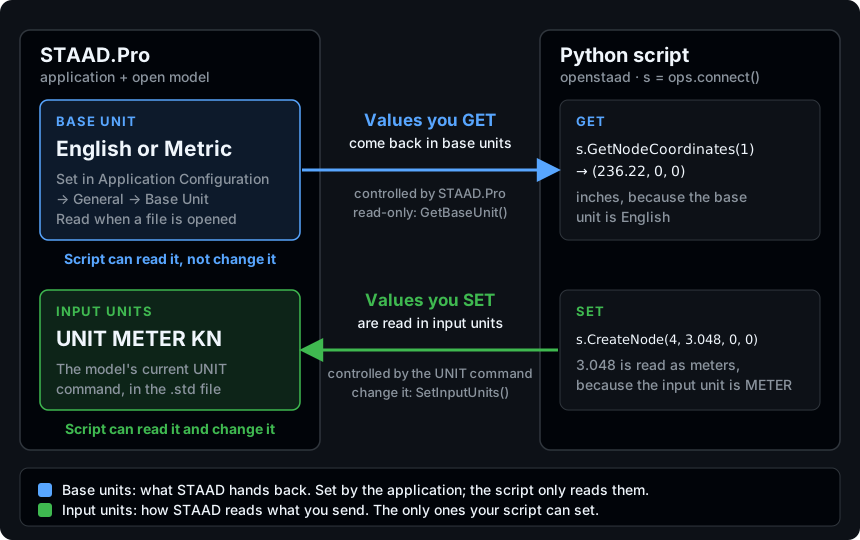
The difference at a glance
| Base units | Input units | |
|---|---|---|
| Direction | Values you get (STAAD → script) | Values you set (script → STAAD) |
| What they are | English (in, kip) or Metric (m, kN) | The model's UNIT command, such as UNIT METER KN |
| Who controls them | The STAAD.Pro application (Application Configuration → Base Unit) | The model, through its UNIT command |
| Can your script change them? | No | Yes, with SetInputUnits() |
| How to read them | GetBaseUnit() | GetInputUnitForLength(), GetInputUnitForForce() |
| Details | Base Units | Input Units |
What it means for your scripts
Getting this wrong is silent. Nothing raises, nothing warns, and the design check just comes out wrong.
print(s.GetBaseUnit())              # -> "English"

x, y, z = s.GetNodeCoordinates(1)   # (236.22, 0, 0): inches (base)
s.CreateNode(4, 3.048, 0, 0)        # 3.048 read as meters (input)
- A returned
236.22is not 236 m. It is 236.22 in, or 6 m, in a model whose base unit is English. You never choose the unit of a returned value, so readGetBaseUnit()and convert. - The base unit is not in the file. It belongs to the STAAD.Pro installation that opens the
model, so the same
.stdcan return different numbers on two machines. Never assume it from how the model was built. - Changing the input units changes every later write.
SetInputUnits()does not alter what you read back, but from then on every value you send is taken in the new unit.
Three habits that keep you safe
- Read
GetBaseUnit()at the start of every script, and convert returned values at the boundary. Label every number you print with its unit. - Read the input units before you send anything, and set them to match the base units so sent and returned values share one system.
- Never assume a value's unit from how the model looks in STAAD.Pro. The interface can show meters while OpenSTAAD returns inches.
Where to go next
- Base Units — the units of returned values, why they are an application setting, every derived quantity and a conversion pattern.
- Input Units — the units of sent values, the integer unit codes and how to set them safely.